
5 July 2026 – joe@cupano.com
Computer hardware components have become extremely expensive especially for those who prefer to build their own servers and the like. The nickname I give for my home lab is “the Dungeon” because my lab is in an unfinished basement it is nice and cool year-round. Uncooperative hardware meets the barbarism of my soldering iron and solder sucker for harvesting, hence the dungeon.
But expense was going to be expected if I was going to build an at-home (on-premise) sovereign AI server. For this build I went with battle-hardened corporate surplus: Dell Precision T5820 workstation, 64GB RAM, with a 950W PSU.
This is not unusual since there are plenty of stories of home labs being built with corporate surplus data center kit mixed with new kit. But little did I know on the other end of this journey I was going to share the 1000-yard stare of those who have been through the valley of potential insanity. With that said, what follows is an educational and slightly frustrating journey through hardware collisions, hidden memory maps, and having hardware just get along no matter it’s heritage. Ready your favorite refreshment. Here we go!
Physical Geometry
For GPU cards I started with the corporate surplus, the NVIDIA Tesla P40 which has 24GB VRAM for~$300 USD. Sweet, I thought, dodging paying double for a GPU with less VRAM. Only two issues I would need to address were cooling and power connectors. The P40 is used in rackservers getting passive cooling from front-to-back cooling the rackserver itself provides. So I bought a blower and a 3d-printed shroud for the blower to direct air flow across the Tesla P40’s heatsinks. It looked very pretty all put together. I was proud.
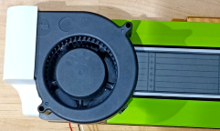
While I got it to fit in the box issues cropping up later in the build.
Power & Connectors
Local AI workloads spike a GPU to its absolute thermal and current limits for prolonged periods. Even if a workstation boasts a high-wattage power supply (such as Dell’s 950W modular PSU), the internal electrical wiring is frequently split across isolated, proprietary multi-rail lines.
If you have power-hungry card that requires dual 8-pin or modern 12VHPWR connectors you can easily trigger an Over-Current Protection (OCP) trip on a single internal power rail even if the total system wattage is well under the PSU’s limit.
Tesla P40 fits the profile requiring me to buy a Y power connector to source power across two separate power rails on the PSU. Still smiling patting myself on the back insuring when I bought T5820 it had the bigger 950W PSU.
Motherboard Compatibility
Since the Tesla P40 is a data center GPU it lacks a visual display out and demands massive continuous blocks of memory to map frame buffers into system space immediately at startup.
Motherboards from workstation OEMs like Dell frequently disable “Above 4G Decoding” inside their BIOS firmware by default—and completely hide the ability to enable. If a card like a Tesla P40 demands a 24GB window, a standard workstation firmware configuration will choke during POST, locking up the system with hardware diagnostic codes before the operating system can even try to manage the resources. Fuck !!!!
Yes, there are ways to hack around this. I looked down the rabbit hole on the how and risk of bricking things. Even though I have a high pain threshold for such things, time is money and decided to pull the P40 and roll with the NVIDIA RTX 5060 Ti with 16GB VRAM at ~$600 USD.
Well that might be “game over” for the P40 in this build, the memory issue had me think on what else I need to be cognizant of in the re-use of corporate surplus for AI workloads before the recent evolution of AI.
Performance Bottlenecks
When deploying machine learning models, autonomous agent frameworks, or deep learning training pipelines on workstation-grade kit, performance isn’t just about the GPU you added it is also about balanced systems architecture. Several architectural bottlenecks that exist include:
Memory Bandwidth
While older data center surplus cards like the NVIDIA Tesla P40 are half-the price and double the VRAM of new consumer GPU cards, performance varies for LLM inference with memory bandwidth becoming the bottleneck.
| Card | VRAM | Memory Bandwidth |
| NVIDIA Tesla P40 | 24GB | 346 GB/s |
| NVIDIA RTX 5060 | 16GB | 448 GB/s |
Narrower bandwidth for the Tesla P40 means its processing cores spend more time idling, waiting for data to stream in whereas a RTX 5060 Ti will be snappy with token generation.
During text generation, the GPU must fetch every single weight of the model from its VRAM just to predict a single token. If your model is 12GB, your graphics card must read 12GB of data out of memory for every single word it outputs.
Local inference requires video memory—ideally enough to hold a 14B or 32B model parameter set. The NVIDIA Tesla P40 (24GB) seems like a fantastic hardware life hack on paper. It costs a fraction of modern client GPUs on the secondary market and gives you a massive 24GB frame buffer. This what I was after but my choice in workstation made it no longer feasible given crash on boot.
PCI Bus Bandwidth
Bandwidth comes into play again as you onramp to the PCIe bus.
Xeon CPU has a massive lane budget of 48, 64, or even 128 lanes. You can plug in a GPU (x16 lanes), a high-speed network card (x8 lanes), and a massive storage array (x16 lanes), and everyone gets their own dedicated, unshared, maximum-speed highway straight to the distribution center.
Contrast this to an i7 desktop CPU with only 20 lanes on the PCI bus. A GPU card plugged into the main PCIex16 slot immediately eats up 16 lanes. If you try to add a second card you may run out of lanes with the motherboard dynamically “shrinking” your GPU down to an 8-lane highway (x8) so it can steal those other 8 lanes and “wire” them to the second card card. A high-speed NVMe storage adapter card only needs an x4 highway (4 lanes).
If you try to run an LLM that spills out of your GPU VRAM the card must constantly fetch data directly from system RAM over the PCIe bus.
CPU-GPU Connection Speed and “Spillage”
When context lengths grow large like forcing a local context out to 32,000+ tokens or when models spill past your VRAM limits, the connection speed between the CPU and GPU becomes critical.
If a model’s parameters or the KV Cache (the conversational short-term memory) exceed the card’s VRAM pool, parts of the processing workload must offload to standard system RAM.
When that happens, the data must travel over the physical PCIe slots on the motherboard. The moment an AI workflow has to wait on the PCIe bus to fetch parameters from host RAM, token generation speed collapses to a crawl.
When running multi-agent orchestrators that execute raw Python tasks, run local file parsers, or manage sandboxed container environments, the system CPU itself becomes a bottleneck. The CPU handles all the background “scaffolding” tasks—spawning containers, loading files into memory, and feeding tokens back and forth to the GPU execution layers. If your CPU must jump in to assist with matrix math or running embedding models during local RAG processes, the lack of native hardware-accelerated instruction pathways will cause severe CPU processing delays, dragging down the efficiency of the entire agent loop.
Lessons Learned
Mixing Data Center Surplus and Consumer Components.
Unless fucking with data center surplus is your thing, you live for tracking down memory address layout definitions, know how to tickle hidden BIOS settings to your will, stick to consumer GPU cards. Spending double for the “Ti” pays for the time/pain/suffering that could have been avoided.
Reciprocally, using data center tower platform with consumer/pro-consumer kit as advantages when it comes to reliability and I/O bandwidth. I may sell my Tesla P40 for another T5820 or better unless I run into use case where I need all that VRAM to avoid CPU use.
A massive 24GB pool on an old card can hold larger LLMs, but its lack of processing optimization slows down token speeds. Newer Blackwell Tensor cores running on hyper-fast GDDR7 memory configurations make local model execution feel vastly more interactive.
Measure Card Geometry and Airflow Layouts
You can do all the searching you want taking note of the size of things but not until you have hardware in hand do you appreciate or regret your choices. Modern graphics cards are thick. When they say they are 2-slot in size think 2.5, when they say 2.5-slot size it’s a hard 3. Ensure any high-speed storage NVMe expansion cards are assigned to slots that are physically clear of your cooling fan lines and hope you have enough lanes if you are not running a Xeon.
In closing
I walked into this build thinking if I am using OEM kit across the board and cards the OEM has strongest mutual relationships with, I thought this would be a slam dunk build.
I do not regret going down the path and the unforeseen wisdom gained along the way. My Sovereign AI build is running with the NVIDIA RTX 5060 Ti (16GB) in my Dell Precision T5820 workstation, 64GB RAM, with a 950W PSU while my Tesla P40 with shroud and blower awaits a future AI project where the P40 shines.
The build is serving me well as I build and test various AI stacks against use cases across verticals. Use cases will be a future post.
For What its worth,
– Joe